跳到主要內容

Wenlan文瀾

值得信任的 wiki。

你的 agents 邊工作邊寫的第二大腦:repo 事實、客戶通話、訓練計畫。每一頁都保持有引用、有連結、跟得上現況,你不用自己維護。

每個 claim 都有引用過時事實自動被取代頁面彼此連結
可搭配Claude CodeCursorCodexClaude DesktopVS CodeObsidian

下⁠載⁠適⁠合⁠你⁠系⁠統⁠的 Wenlan。

Wenlan v0.15.8 提供 macOS 桌面預覽版,以及原生 CLI、本地 daemon 與 MCP connector 套件。

推薦給這台裝置

選擇正確版本

瀏覽器無法辨識這台裝置支援的桌面版本。

查看全部下載

每個 wiki 都死於乏人照料。

先是手工照料的 vault,接著是掛上 wiki 的 agents:寫得更快,一樣腐壞。Wenlan 是接下來的那一步。

gen 0Wiki 墓園superseded

Obsidian vaults、Notion 頁面、團隊 wiki。全靠手工照料,你的紀律撐多久,它就活多久。

gen 1初代 llm-wikisuperseded

Agents 把筆記倒進 Markdown 檔案。沒有來源、沒有 recall、沒有維護。它腐壞得更快,還更有自信。

Obsidian 加上 agentssuperseded

Agents 寫進你的 vault,但園藝活還是你的。捕捉變容易了,腐壞照舊。

gen 2 and beyondWenlancurrent

會自我維護的 llm-wiki:在真實工作中寫成、引用到來源、由 hybrid recall 找回、在你睡覺時持續 enrich。

capturerecallenrich

而在你睡覺時,wiki 只會變得更好

給 code、客戶工作、研究用的 LLM wiki。

Wenlan 把 repo 事實、客戶限制、source trails 和讀書筆記變成 agent 能簡報、召回、交接的 source-cited 頁面。

維護工程師真的會更新的 codebase 文件。

會持續更新的工程文件 · 28 sources

Auth v2 migration

有來源
token backfill
flag flip
30d expiry
Rollout

Cutover blocks on the session-token backfill; run it before the flag flip.1

Legacy tokens stay valid for 30 days after cutover, then hard-expire.2

Cites

/migrations/auth-v2Rollout
/runbooks/releaseRollback

下一個 agent 打開的是工程師也會更新的 living docs。

The long tail
[[meeting notes]][[incident reviews]][[trip planning]][[reading lists]][[hiring loops]][[home lab]][[language study]][[competitor teardowns]][[grant applications]][[garden log]][[gift ideas]][[tax season]]
[[postmortems]][[api quirks]][[vendor notes]][[recipe box]][[team rituals]][[conference notes]][[side projects]][[health logs]][[renovation plans]][[paper trails]][[dnd campaigns]][[onboarding docs]]

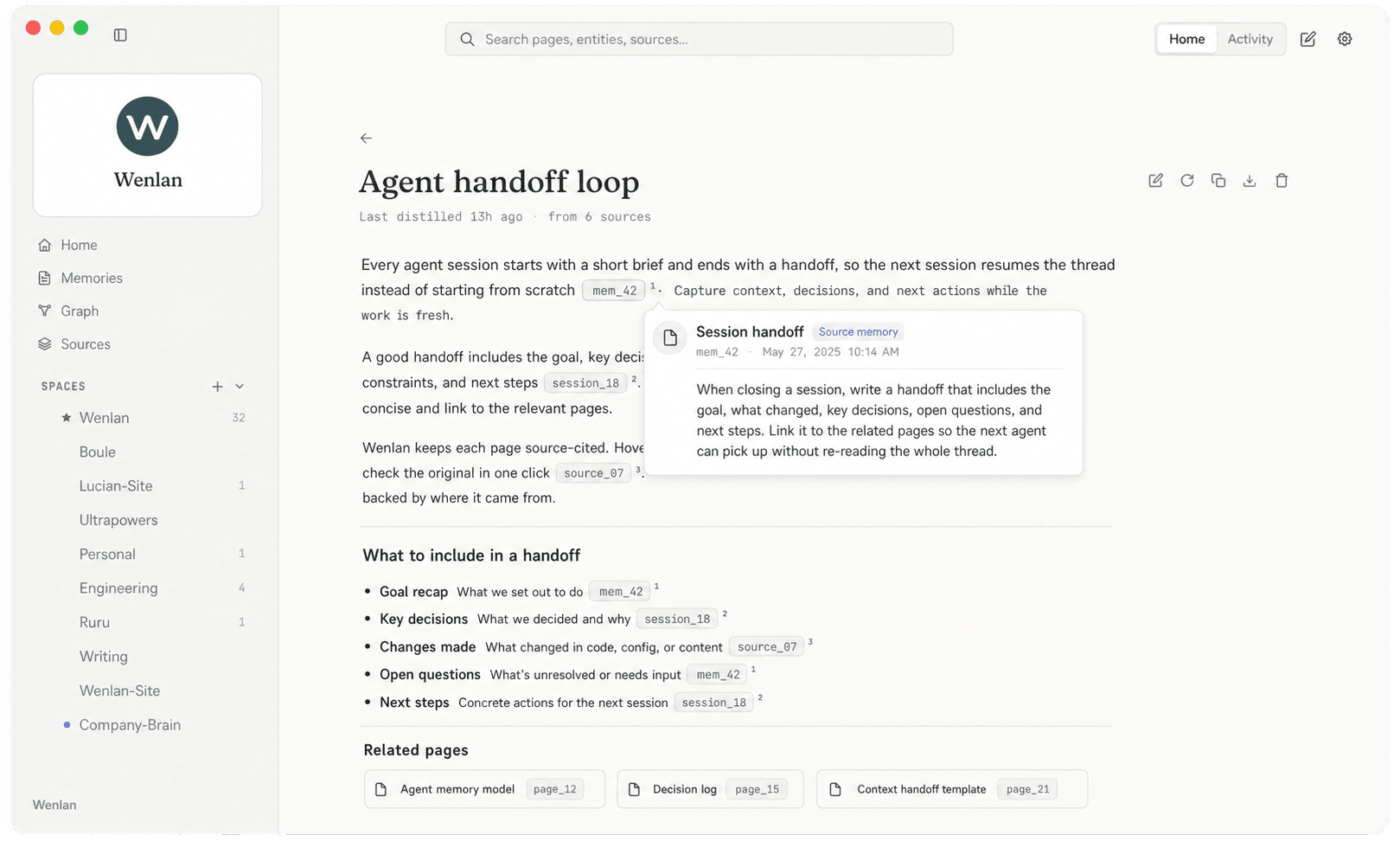
給 AI 工作用的 handoff 循環。

Wenlan 在工作發生時捕捉決策,在 sessions 之間精煉 wiki,並在下一個 session 開始時送上簡報。

/capture · session 進行中

工作留下軌跡

  • + rollback needs db lock
  • + client capped budget at 40k
  • + claim in section 2 went stale

/distill · sessions 之間

重複出現的內容變成頁面

DedupLinkSupersede

當某個主題值得立刻成頁時,agents 也會直接建立頁面。

/brief · 下一個 session

下一個 agent 熱啟動

Release runbook

cites /runbooks/release, /docs/architecture

下一段對話從 handoff 開始,而不是重新拼回過去。

工作會變成可重用的頁面。

人類讀得懂,agents 用得上

整理過的決策和教訓變成耐用的頁面,而不是埋在聊天記錄裡。

Migration plan

6 sources cited

Runbook

8 sources cited

Architecture map

10 sources cited

Recall 帶著脈絡一起回來

人、專案、頁面會連著 memory 也彼此相連地回來,recall 到手時就帶著整個鄰域。

每個 claim 都留著來源

Wenlan 拒絕沒有來源的頁面。每個蒸餾出的 claim 都引用產生它的 memory,隨時可以回溯重查。

# Architecture map

Search writes go through the ingest daemon; the API crate only reads.[1]

[1] mem_0142 · decisionfrom/docs/architecture

先審核,再信任

低信心的捕捉和矛盾會浮上來等你審核,而不是悄悄進入 context。你只在要緊時介入。

contradiction

low confidence

new: “staging deploys from main”

mem_0087: “staging deploys from release branches”

supersedekeep both

每一輪都更新鮮

在 sessions 之間,背景批次會連結 entities、擴充相符的頁面、淡化過時的 memories。

+ linked Dana to checkout redesign

~ refreshed page: architecture map

faded 3 stale memories

Spaces 讓工作各歸各位

捕捉和 recall 都帶上 space 標籤,客戶事實永遠不會滲進 side project 的簡報。

space: work128

space: personal41

space: client-arden67

像程式碼一樣有版本

Memory、頁面和 session artifacts 都活在真正的 git 歷史裡。可檢視、可 diff、可還原。

a41f2c distill: architecture map

9d03b7 capture: rollback lesson

3c88e1 handoff: session close

一個家,不被任何工具綁死

每個 MCP client 都透過同一個本地 daemon 讀同一份共享記憶。檔案永遠是你的。

Claude CodeCursorCodexClaude DesktopVS CodeGemini CLI

~/.wenlan

one shared memory

local daemon · plain files

Agents 拿到索引。 你拿到檔案。

捕捉先進到快速的本地索引,再凝固成你能打開、diff、保存的 Markdown 頁面。

索引 · agents 的工作記憶

recall:“staging rollback”
FTS5 · exact termmem_0231 · rollback needs db lock
vectors · paraphrasemem_0142 · deploy reverts hang
graph · entity linkmem_0087 · project: checkout → deploy gotcha
all three return together, rankedreciprocal rank fusion

三條路進來,一次查詢。任何單一路徑都會漏掉其中兩條。

staging

mem_0231 · rollback needs db lockstaging
mem_0198 · budget capped at 40kready to distill

Markdown · 屬於你的長期紀錄

~/.wenlan/pages/architecture-map.md

# Architecture map

Writes go through the daemon. [^1]

[^1]: /docs/architecture

a1b2c3d page: architecture-map refreshed (4 sources)

Obsidian-compatible · grep-able · yours to move

×只有檔案

每次 recall 都要重讀整個資料夾,context window 買單。

×只有資料庫

快但不透明。沒有東西可以打開、diff 或搬走。

索引 + 檔案

給 agents 一次查詢。給你可讀、有版本的檔案。

Hybrid retrieval,實測

少 96% tokens。

Hybrid retrieval 不需要重播聊天歷史,也能找到正確的本地 context。

自己執行 harness。

完整聊天重播

每次查詢 4,505 tokens / query

不使用 retrieval,整份 transcript 進 context

Wenlan 檢索

每次查詢 168 tokens / query

CE-reranked,500 題 snapshot

93.6% Recall@50.883 NDCG@100.857 MRRLME_Oracle snapshot

Retrieval-only snapshots。LME_S 在 stratified N=90 deep-S fixture 上記錄 87.7% R@5 和 0.815 MRR。Token 比較是完整重播對 retrieved context。

常見問題。

Wenlan 是什麼?

Wenlan 是 AI 工作的 LLM wiki。AI 代理捕捉學到的內容,你加入信任來源,本地 daemon 讓有來源依據的 wiki 頁面跨 chats、tools、projects 和時間保持最新。

Wenlan 和內建 AI memory 有什麼不同?

內建 memory 會保存 AI 認為重要的內容。你通常無法追蹤、修正,或從另一個工具使用它。Wenlan 讓 memory 留在本地、可見、可修正、可追溯。可讀 pages、session logs 和 project status 都 versioned in ~/.wenlan/.git/,每個 distilled page 都會引用產生它的 source memory IDs。

Wenlan 的 retrieval quality 到哪裡?

Hybrid retrieval 結合 vector search (BGE-Base-EN-v1.5-Q, 768-dim)、FTS5、reciprocal-rank fusion、knowledge-graph context 和本地 BGE reranker。LME_Oracle 在 500-question snapshot 上是 93.6% Recall@5、0.857 MRR、0.883 NDCG@10。LME_S 在 stratified N=90 deep-S snapshot 上是 87.7% Recall@5、0.815 MRR、0.822 NDCG@10。Eval harness 放在 repo 的 crates/wenlan-core/src/eval/。

我的資料是私密的嗎?

是。Wenlan 在你的機器上執行,資料庫也存放在本地。預設沒有 cloud sync 或 telemetry。本地 memory setup 不需要模型或 API key。On-device models 或 Anthropic key 只有在你選擇啟用 automatic page distillation、recaps 和更豐富 graph work 時才會使用。

Wenlan 只是另一個 memory MCP 嗎?

不是。MCP server 只是 connector。Wenlan 還包含本地 daemon、manual /distill、可選的 model-backed background extraction 和 page work、具備 DiskANN vectors 的 libSQL store、FTS5 + knowledge graph、mandatory provenance、memory/page/session artifacts 的真實 git versioning,以及可讀的 Markdown export paths。

哪些 AI tools 可以搭配 Wenlan?

Claude Code 和 Codex 有 plugin 路徑。Cursor、Claude Desktop、VS Code、Gemini CLI 等本地 clients 透過 Wenlan 的 MCP server 連接。ChatGPT 和 Claude.ai 使用 Streamable HTTP MCP,desktop app 的 Remote Access 提供引導式路徑。Remote Access 沒有驗證;任何拿到 URL 的人都能存取 Wenlan,因此不用時請停止 Remote Access。

Wenlan 能取代 Notion 或 Obsidian 嗎?

不能。Wenlan 不是 notes app,也不是 writing tool。它捕捉並整理你從 AI conversations 學到的內容。如果你想在 Obsidian 閱讀,可以把 ~/.wenlan/ 底下的 Markdown projection symlink 進去。

我要怎麼設定?

Claude Code 使用 marketplace plugin 和 /setup。Codex 可以使用 Wenlan plugin,或執行 wenlan connect codex。其他本地 clients 使用 wenlan connect <client>。ChatGPT 和 Claude.ai 透過 desktop app 的 Remote Access URL 使用 Streamable HTTP MCP。該 URL 沒有驗證,請視同秘密,並在不用時停止 Remote Access。

Wenlan 支援 Windows 或 Linux 嗎?

支援。當前預編譯 daemon release 覆蓋 macOS Apple Silicon、Linux (x86_64, aarch64; glibc) 和 Windows (x86_64)。macOS Intel 仍可走 source/dev 路徑,但目前沒有 macOS Intel 預編譯執行環境。Service registration 在 macOS 使用 launchd、Linux 使用 systemd-user、Windows 使用 Task Scheduler (schtasks)。

我可以把工作和個人 memory 分開嗎?

可以。Memories、pages 和 recalls 都屬於一個 space,例如 work、personal 或 client-X。你可以用 WENLAN_SPACE 在每個 shell 設定 active space,或在 ~/.wenlan/spaces.toml 宣告。Auto-detector 也會從目前 repo 或 workspace 選擇 space。

Wenlan 免費嗎?

是。Wenlan 是 open-source。Wenlan repo 裡的本地 runtime、CLI、MCP server、Claude Code plugin 和 Codex plugin files 都是 Apache-2.0。

開源

在重要的地方保持開放。

本地 runtime、CLI、MCP server、Claude Code plugin 和 Codex plugin 都是 Apache-2.0。

取得 release 更新。