Skip to content

A living wiki for you and your AI

Notes and chats pile up.Still starting over?

Wenlan turns documents and decisions into a source-backed wiki you and your AI can pick up next time.

Illustrative workflow · not live product output

This request failed. How should we retry it?

Retry failed GET requests up to 3 times; never retry POST automatically⁠[1][2]. The timeout boundary is still unspecified⁠[3].

View sources(3)

We already confirmed that reads and writes need different retry rules.

[1]api-v1.mdAPI retry rule
Supplied excerptGET /reports: after a failed first attempt, allow up to 3 retries. POST /payments: do not retry automatically.
[2]decision-07.mdClient decision
Supplied excerptUse the API's GET retry cap of 3 to limit repeated requests. Automatic POST retries are disabled because duplicate payments are unsafe.
[3]runbook-v1.mdLogging and timeouts
Supplied excerptRecord the endpoint, attempt number, and final failure in the local test log. The request timeout has not been decided.
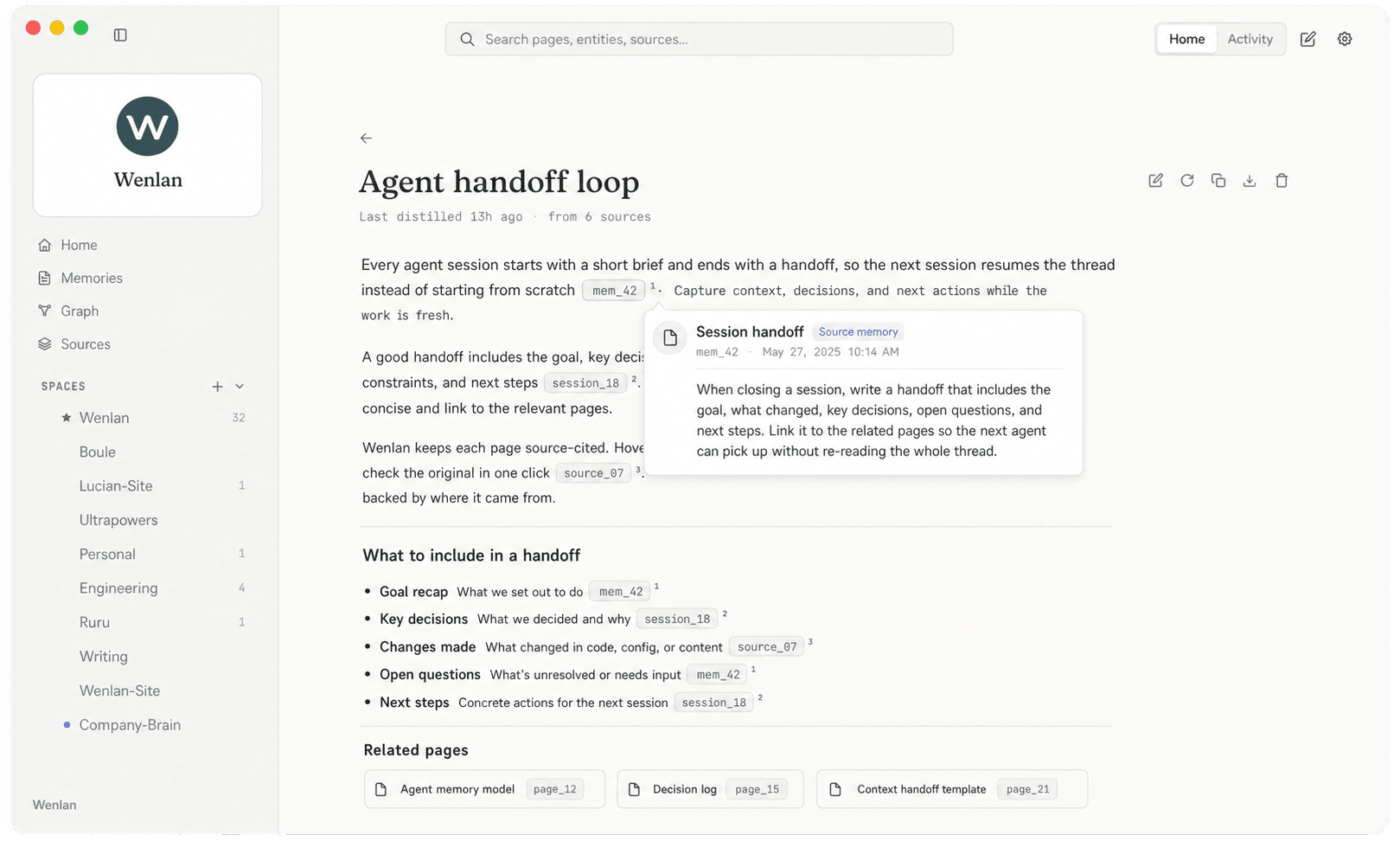
Read the worked example

Wenlan desktop showing the Agent handoff loop page with a source citation expanded.

Recorded product demonstration. It shows one workflow, not proof of every Wenlan workflow.

Choose the knowledge workflow that fits.

Compare more than features: see where you work day to day, what you can hand off, and which decisions remain yours.

Wenlan first needs connected sources and a model, then an initial set of Pages. After that, use the desktop App, or continue with the plugin / CLI and local daemon.

How do you manage knowledge today?

AI handles the files; Wenlan supplies the source tracking, Wiki upkeep, and revision review. Your work leaves more than another answer: a knowledge base maintained for later use.

Both watch folders and handle more than files. Wenlan also tracks individual knowledge records and the pages that rely on them; LLM Wiki centers upkeep on sources and Wiki pages.

Keep writing notes in Obsidian, let Wenlan read the originals, and maintain a separate Wiki for you and your AI.

Notion lets you configure Agents for workspace tasks; Wenlan makes source tracking, page upkeep, and edit review an integrated flow. Both can run automatically.

NotebookLM helps you understand a set of sources; Wenlan builds those materials and work decisions into a Wiki that connected AI tools can use later.

Choose the knowledge workflow that fits.
Wenlan

AI-native knowledge base

Word · PDF · PPT · Markdown

nashsu/llm_wiki · open-source project

Obsidian · local Markdown vault

Notion · cloud workspace

Google · Gemini Notebook

How do you use it day to day?
An AI knowledge base with upkeep built in

Documents and saved decisions become a cited Wiki. Retrieve prior conclusions and their evidence from connected AI tools, then continue the work.

Keep your AI tools; no extra App to open

After setup, save and retrieve knowledge from connected AI tools. The local background service runs without the desktop App.

Keep the vault; maintain a separate Wiki

Connect the vault as a read-only source; keep writing originals while Wenlan builds pages for you and AI.

No need to move into a new workspace

Save and find knowledge in connected AI tools; documents and decisions stay local without changing editors.

Bring reading back into work

Save conclusions and decisions in a local knowledge base, then find them through connected AI tools for the next task.

Work directly with files and answers

AI reads, answers, and edits. Save outputs for reuse; a maintained, cross-source Wiki needs a separate system.

Work from a desktop Wiki project

Import documents, ask questions, and save answers in the App. External AI tools can connect through MCP while the App is running.

Write your own Markdown notes directly

Write notes and link ideas in a vault; connect a plugin or external tool when you need AI.

Arrange work in a shared workspace

Organize personal or team work with pages, databases, and permissions; Notion Agent can create and edit.

Ask from sources and make study materials

Ask questions, summarize, or make study materials from selected sources; notebooks can also be used in Gemini conversations.

What upkeep happens automatically?
Keep related knowledge up to date

New decisions can enrich existing pages. After connected files or memory content change, background processing refreshes eligible affected pages.

Changed knowledge flags affected pages

Editing or deleting a memory, or accepting its replacement revision, flags the existing pages that cite it. Background work then refreshes eligible pages.

Note changes, knowledge pages follow

After Wenlan is configured, background tracking follows connected sources and refreshes eligible pages without rewriting your vault.

Knowledge maintenance is built in

When sources change, background tracking refreshes affected pages; pages you wrote become proposed revisions.

More than sync: update knowledge pages

Background tracking follows source changes and refreshes eligible existing Wiki pages, not just another source copy.

Knowledge upkeep needs additional logic

Tools can read new versions and retain memory. Tracking changed sources, stale pages, and refreshes requires additional upkeep logic.

Upkeep works on sources and Wiki pages

Source-file changes or answers saved back to the Wiki can trigger automatic page compilation. Research results are also saved as pages.

Let selected plugins handle it

Hand AI search, rewriting, or organization to plugins; choose features, set rules, and maintain them.

You set tasks; Agent runs them automatically

Custom Agents can run on schedules or events; set instructions, triggers, and access permissions first.

Drive updates sync sources automatically

Eligible Google Drive sources sync when you open the notebook; uploaded files are copies made at import.

When do I decide?
Keep originals; approve edits to your writing

Source files stay unchanged. AI proposes a revision before updating pages you edited; you accept or reject it, with change history available.

Pages you write: review before changes

When AI wants to update a page you wrote, it proposes a revision; the original waits for your approval.

Original notes stay untouched; review drafts first

Wenlan does not write back to the vault; pages you edit also get a revision first, then you decide.

Personal edits: ask before changing

You decide whether to accept a page revision; machine-maintained pages update as configured and keep history.

You decide whether important edits land

Pages you wrote keep their original text while AI proposes a revision; you choose whether to accept or keep it.

File controls; knowledge-review rules are extra

Permissions and diffs control file edits. Automatic refresh versus review of human-edited knowledge pages needs separate rules and checks.

Keep ingest moving; review follow-ups separately

Ingest writes pages first; Review lists follow-ups such as further research or new pages without blocking ingest.

You decide what tools can change

You keep the vault; choose plugins and backups, and check whether AI can write to original notes.

You control rules and workspace permissions

Set the Agent’s access, inspect activity logs, and use Notion’s history and reversal controls.

You choose sources and sharing

Choose which sources to cite and who can access the notebook; original Drive files are not written back.

Your sources. Your tools. One place to build on.

Start with what you already have

Bring your past conversations, research notes, and project documents into Wenlan. Start with ChatGPT or Claude export ZIPs, Markdown, text, text-extractable PDFs, or a folder of supported files.

OpenAIChatGPTClaudeClaudeObsidianObsidian
Build a knowledge base from your documents

Bring it into your next session

Connect your AI tools to find the decisions and source-backed Pages you kept. Each client needs its own setup and access permissions.

ClaudeClaude CodeCursorCursorOpenAICodexClaudeClaude DesktopVisual Studio CodeVS CodeAntigravity
Connect your tools

A handoff loop for AI work.

After provider and client setup, Wenlan can save useful decisions, build sourced Pages when configured processing runs, and help the next session find them.

Illustrative workflow · not live product output

  1. /capture · during the session

    Save useful decisions

    • + migration rollback needs db lock
    • + release runbook records recovery step
    • + staging claim needs review
  2. /distill · between sessions

    Build a sourced page

    DedupLinkSupersede

    Agents can also create Pages directly when a topic deserves one right away; provider and client setup still apply.

  3. /brief · next session

    Find it next time

    Release runbook

    cites /runbooks/release, /docs/architecture

The next conversation can start from the handoff instead of reconstructing the past.

See the pages. Follow the connections.

Knowledge around Wenlan: connected records, entities and wiki pages. Real-data screenshot provided by Wenlan's creator, September 6, 2026. A view of the graph, not a live connection.

Knowledge around Wenlan: connected records, entities and wiki pages.

Scroll or swipe to explore the enlarged image.

Open original

The work becomes reusable pages.

Illustrative product artifacts · not live product output

Readable by humans, organized for agents

Cleaned decisions and lessons become durable pages instead of buried chat logs.

Migration plan

6 sources cited

Runbook

8 sources cited

Architecture map

10 sources cited

Find the answer with its context

Configured retrieval can bring back people, projects, and Pages with links to source memories and related items.

Follow the source

Wenlan records source links on distilled Pages so you can inspect supporting memories. Source links do not prove every claim by themselves.

# Architecture map

Search writes go through the ingest daemon; the API crate only reads.[1]

[1] mem_0142 · decision
from/docs/architecture

Review before you rely

Configured review flows can surface low-confidence captures and contradictions. You decide what is worth trusting in future context.

contradiction

low confidence

new: “staging deploys from main”

mem_0087: “staging deploys from release branches”

supersedekeep both

See what needs another look

With background processing configured, batches can link entities, update matching Pages, and flag stale memories for attention.

+ linked Dana to checkout redesign

~ refreshed page: architecture map

− faded 3 stale memories

Spaces keep work apart

Tag captures and recalls with a space; when the client and active space are configured, different contexts can stay separate.

space: work128

space: personal41

space: client-arden67

Versioned like code

Memory, pages, and session artifacts live in real git history. Inspect, diff, revert.

a41f2c distill: architecture map

9d03b7 capture: rollback lesson

3c88e1 handoff: session close

Bring knowledge across tools

Configured MCP clients can read local memory through one daemon; setup and client permissions determine what they can access.

Claude CodeCursorCodexClaude DesktopVS CodeAntigravity

~/.wenlan

one shared memory

local daemon · plain files

Remember the idea, not the exact words?

Hybrid Retrieval combines keyword, semantic, and graph context to help find relevant knowledge. Configured Page work turns sources into Markdown you can read, check, and keep.

Illustrative retrieval and file flow · not live product output

Index · working memory for agents

recall: “staging rollback”
FTS5 · exact termmem_0231 · rollback needs db lock
vectors · paraphrasemem_0142 · deploy reverts hang
graph · entity linkmem_0087 · project: checkout → deploy gotcha
all three return together, rankedreciprocal rank fusion

Files, an index, and Page work solve different needs. Choose the boundary your workflow can maintain.

staging

mem_0231 · rollback needs db lockstaging
mem_0198 · migration step needs reviewready to distill

Markdown · lasting record for you

~/.wenlan/pages/architecture-map.md

# Architecture map

Writes go through the daemon. [^1]

[^1]: /docs/architecture

a1b2c3d page: architecture-map refreshed (4 sources)

Obsidian-compatible · grep-able · yours to move

Plain files

A fit for a small, stable set that you or an agent can search directly. As it grows or changes, you may need explicit retrieval and review.

An index

Useful for fast lookup across configured sources; pair it with readable artifacts and a review path when people need to inspect changes.

Index plus files

Combine lookup with readable, versioned artifacts. Whether it fits depends on your source boundary and maintenance workflow.

How much context does a query need?

A fixed 500-question retrieval test compares full conversation replay with the context Wenlan retrieves.

Evaluation snapshot: (published date; exact run time not recorded)

Full chat replay

4,505 tokens / query

No retrieval, whole transcript in context

Wenlan retrieval

168 tokens / query

CE-reranked, 500-question snapshot

93.6% Recall@50.883 NDCG@100.857 MRR

LME_Oracle · CE-reranked · 500 Q

Full results and test scope
SurfaceScopeResult
Full replayNo retrieval4,505 tokens / query
LME_OracleCE-reranked, 500 Q168 tokens / query · 93.6% R@5 · 0.883 NDCG@10
LME_SCE-reranked, N=90 deep-S168 tokens / query · 87.7% R@5 · 0.822 NDCG@10

Retrieval-only snapshots on fixed fixtures. LME_Oracle also records 0.857 MRR; LME_S records 0.815 MRR on 84 gradeable rows from the 90-question deep-S fixture. This is not a general time or token-saving guarantee and does not compare Wenlan with other tools. Token comparison is full replay vs retrieved context within this retrieval test.

Run the harness yourself.

Download Wenlan for your system.

Wenlan v0.18.14 ships a Windows x64 desktop build and a macOS Apple silicon DMG, plus headless runtime builds for Windows, macOS, and Linux.

Recommended for this device

Choose the right build

We could not identify a supported desktop build in this browser.

View all downloads

Common questions.

What is Wenlan?

Wenlan is a local AI knowledge base and LLM wiki. Connect your AI client to save decisions and find them again. Page generation needs a configured model or AI client. Inspect the supporting sources before relying on an answer.

How is Wenlan different from built-in AI memory?

Built-in memory behavior varies by tool. Compare export, sources, editing, and cross-client access in the tool you use. Wenlan keeps memory local and offers inspectable Pages with the source memory IDs used to make them.

What retrieval quality does Wenlan reach?

Hybrid retrieval combines vector search (BGE-Base-EN-v1.5-Q, 768-dim), FTS5, reciprocal-rank fusion, knowledge-graph context, and the local BGE reranker. LME_Oracle is 93.6% Recall@5, 0.857 MRR, and 0.883 NDCG@10 on the 500-question snapshot. LME_S is 87.7% Recall@5, 0.815 MRR, and 0.822 NDCG@10 on the stratified N=90 deep-S snapshot. These fixture-specific scores do not establish correctness or prove every claim. The eval harness ships in the repo at crates/wenlan-core/src/eval/.

Is my data private?

Yes. Wenlan runs on your machine and stores its database locally. No cloud sync or telemetry by default. Local memory setup works without a model or API key. On-device models or an Anthropic key are opt-in for automatic page distillation, recaps, and richer graph work.

Is Wenlan just another memory MCP?

No. The MCP server is the connector. Wenlan also includes the local daemon, manual /distill, optional model-backed extraction and Page work, local retrieval, source references, review surfaces, real git versioning for memory, Page, and session artifacts, and readable Markdown export paths.

What AI tools work with Wenlan?

Claude Code and Codex have plugin paths. Cursor, Claude Desktop, VS Code, Antigravity, and other supported local clients connect through Wenlan's MCP server. ChatGPT and Claude.ai connect through Streamable HTTP MCP, with Remote Access in the desktop app providing the guided path. Obsidian is a read-only source workflow, not an MCP client in this list. Remote Access has no authentication; anyone with the URL can access Wenlan, so stop Remote Access when unused.

Is Wenlan a replacement for Notion or Obsidian?

No. Wenlan is not a notes app. It can register Markdown, text, text-extractable PDF, folders, and an Obsidian vault as sources. Obsidian input is read-only and resyncs on demand; Wenlan's own Pages remain readable Markdown under ~/.wenlan/.

How do I set it up?

Install the runtime and connect the client first. Claude Code uses the marketplace plugin and /setup. Codex can run Wenlan through its plugin or through wenlan connect codex. Other local clients use wenlan connect <client>. ChatGPT and Claude.ai use the desktop app's Remote Access URL through Streamable HTTP MCP. Local capture and retrieval can work without a model or API key; automatic Page distillation and background processing require a configured on-device model or provider API key. The URL has no authentication, so treat it as a secret and stop Remote Access when unused.

Does Wenlan work on Windows or Linux?

Yes. The current prebuilt daemon release covers macOS Apple Silicon, Linux (x86_64, aarch64; glibc), and Windows (x86_64). macOS Intel has source/dev paths but no current prebuilt macOS Intel runtime. Service registration uses launchd on macOS, systemd-user on Linux, and Task Scheduler (schtasks) on Windows.

Can I keep work and personal memory separate?

Yes. Memories, pages, and recalls belong to a space (for example, work, personal, or client-X). Set the active space per shell with WENLAN_SPACE, or declare them in ~/.wenlan/spaces.toml. The auto-detector also picks a space from the current repo or workspace.

Is Wenlan free?

Yes. Wenlan is open-source. The local runtime, CLI, MCP server, Claude Code plugin, and Codex plugin files in the Wenlan repo are Apache-2.0.

Open source

Open code. Make it yours.

From the local runtime to the desktop app, you can inspect the code and build Wenlan yourself.

Runtime and plugins: Apache-2.0. Desktop app: AGPL-3.0-only.

Subscribe to Wenlan release updates.

Used only for Wenlan release updates.