Selection guide
AI Second Brain: Choose an App or Build Your Own?
See how notes become useful work, then compare Claude Code or Codex, Obsidian with optional AI, and Wenlan’s maintained Wiki.
01
Why use an AI second brain?
If you save useful notes but still start each proposal or project update from scratch, a second brain gives you a way to reuse that work. Here, we’ll turn a few notes into an update, then carry what we learned into the next project.
A second brain is a system for keeping and using knowledge outside your head. In personal knowledge management (PKM), that means capturing ideas, connecting them to your work, drawing out what matters and putting it to use. AI can share the connecting and drafting; you bring context and make the decisions.
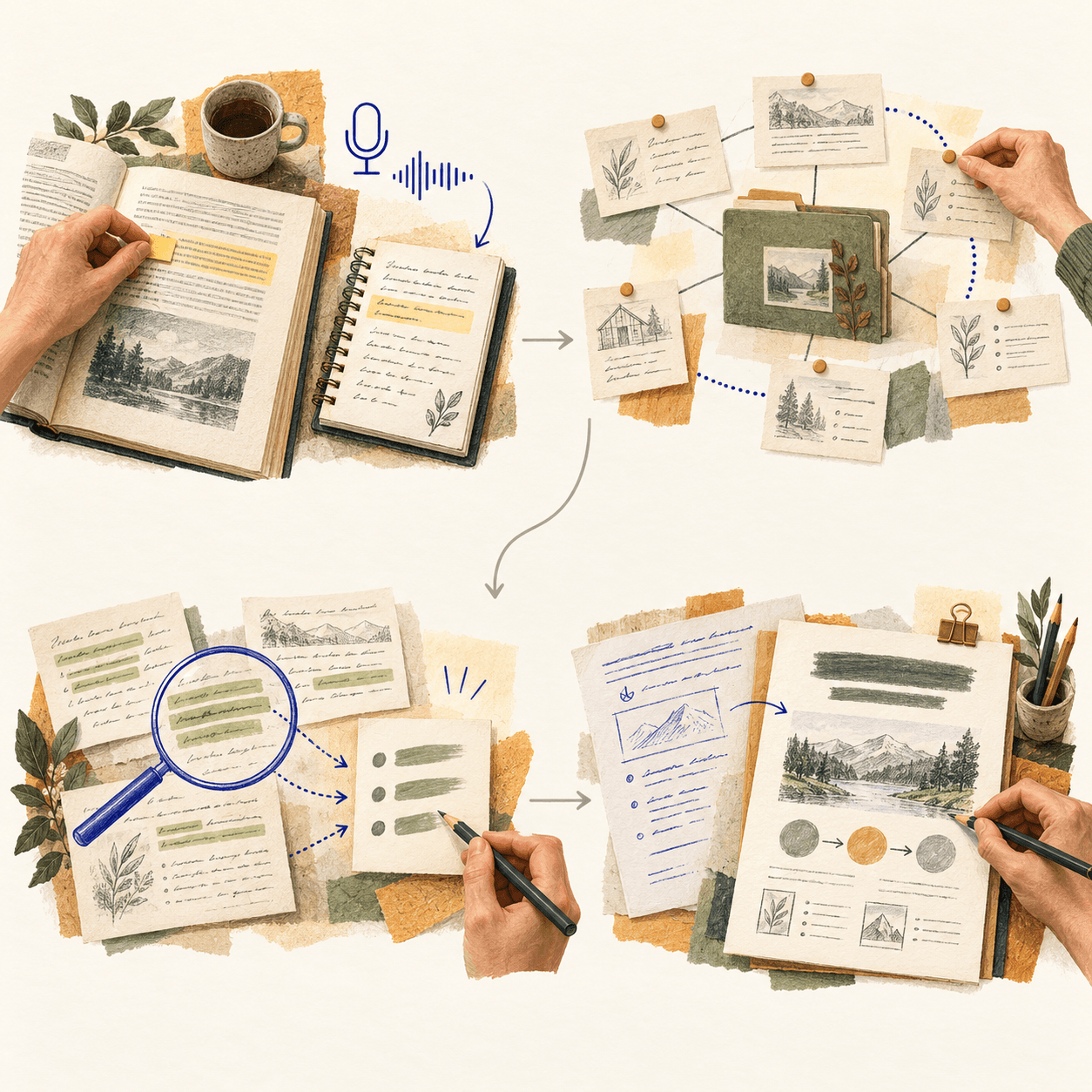
1 · Save what matters
2 · Connect your notes
3 · Pull out the insight
4 · Put it to use
AI: transcribe your ideas
AI: suggest useful links
AI: synthesize across notes
AI: help draft the work
The PKM cycle stays. AI can share the work; you choose what to keep and use. Save the useful result so it can inform the next project.
Concept illustration, drawing on Tiago Forte’s CODE · Ron Forbes
02
Let’s turn a few notes into a project update
Imagine a teammate asks, “Are we still launching on the original date?” You have the brief and the call notes. You also remember the plan changed. Now you need to put those pieces together and tell them what to do next.
We connected Claude to five fictional project notes in Wenlan and asked it to draft an update. I wanted something a teammate could act on, including the decisions still open.
1. Give the AI a few relevant notes
To try the idea without connecting an app, paste two or three short notes about one project into an AI chat you’re comfortable sharing them with. Keep their names and dates. No notes yet? Write what you know and what you need to decide; that is enough for a first attempt.
2. Ask a question you actually need answered
Ask which decision was approved, then open the note behind the answer. In this example, the approved date was January 14, 2027. Pricing was still undecided, so it stayed undecided in the answer.
Ask AI: check the launch plan
Which launch date was approved, and what is still undecided? Name the notes you used. Flag conflicting notes; don’t fill in missing decisions.
3. Make something you can use
Next, we asked Claude for a short update: launch date, confirmed scope, and open decision. Here is what it wrote:
- Launch: January 14, 2027, approved to allow time for the data export review.
- Confirmed scope: support by email, in-app help, and phone; data export as CSV.
- Open decision: pricing. No price has been approved.
Claude’s draft from the five fictional project notes. Notice the open pricing decision and the named sources.
03
Use what you learned on the next project
The update answers today’s question. The notes can also help you work out what to do differently next time. We continued the example with Codex:
1. Ask what to carry forward
We pasted the relevant note excerpts and checked update into Codex, asking what to check before the next launch. It separated facts from suggestions: confirm the approved date, scope and undecided pricing.
Ask AI: make a checklist for the next project
What should I check before announcing the next project? Suggest three questions tied to these notes. Separate facts from suggestions; don’t carry this project’s decisions into the next one.
2. Review it, then save it
We changed the third question to ask who would confirm each open decision; the notes hadn’t named an owner. We saved the revised checklist as next-launch-checklist.md:
- What is this project’s latest approved date and purpose, and what does it supersede?
- Which scope and pricing details are approved, and which remain undecided?
- Who will confirm each open decision before we share the plan?
Source notes: project-brief.md; client-call-2026-10-10.md; decision-2026-10-15.md; review-check-2026-10-22.md.
3. Use the saved note in a fresh conversation
We gave Codex just that checklist and a new fictional project, Harbor, with no approved plan yet. Here are the questions it produced, without copying Cedar’s date or scope:
- What purpose and target date should we propose for Harbor?
- What scope and pricing should we propose for approval?
- Who will confirm each open decision before we share the plan?
04
Three ways to build an AI second brain
When the launch date changes, which saved summary needs to change with it? Compare where you do the work, where the result lives, and who keeps it current.
We build Wenlan. Here is how I would choose between working directly with an AI agent, keeping control in Obsidian, and using a dedicated Wiki app.
Choose this if: you want to control how AI reads, writes and organizes your files.
When a note changes: Give the agent the changed note and ask it to update the project summary.
Where the result stays: Markdown files in your folder, ready to open or edit.
Your ongoing work: Keep your instructions and file organization useful; review AI edits.
Optional kit demo

Setup details
Give the agent access to a folder and tell it what to read and write. A kit can provide ready-made commands and conventions, but you don’t need one to start.
Choose this if: you like deciding how your notes fit together.
When a note changes: Write and link notes yourself. For an AI draft, paste selected notes into a chat.
Where the result stays: Save the checked draft back in your Obsidian vault.
Your ongoing work: Keep summaries current yourself. Copilot can add AI inside Obsidian.
Optional: add AI chat with Copilot
Copilot adds an AI panel beside your notes. Choose the notes or folder to use, ask a question, then check the answer against them. The plugin and its model need separate setup.

Setup details
Create a vault, write notes and link related ideas. Obsidian works without an AI model or plugin. Add Copilot only if you want AI assistance inside it.
Choose this if: you want related notes organized into a Wiki without assembling that workflow yourself.
When a note changes: After source sync, Wenlan prepares updates for affected Wiki pages.
Where the result stays: Wiki pages with references to the original notes.
Your ongoing work: Choose models; review proposed changes to pages you wrote, edited, or locked.
Setup details
Connect a source, choose an AI service, assign models to background organization and Wiki page generation, and enable background upkeep. Keep Wenlan running; updates aren’t immediate.
Each screen shows a separate example. Select a path to see how it works.
05
Already use Obsidian? What would Wenlan add?
Keep writing your meeting notes in Obsidian. Wenlan reads the vault without moving or rewriting your files, then organizes related material into separate Wiki pages with links to the originals.
Say a meeting changes the launch date. Wenlan tracks which Wiki pages use that note and can prepare updates, so you don’t have to find each page yourself. If your existing links, search, or plugins already cover that work, stay with them.
06
Which updates happen automatically?
Once the changed note has synced into Wenlan, background upkeep can prepare updates for the pages that rely on it:
- AI-maintained pages you haven’t edited or locked can update automatically after the draft passes Wenlan’s citation check.
- Pages you created, edited, or locked get a proposed revision. Your saved text stays until you accept; you can skip the change.
If that check fails, Wenlan keeps the current page. It checks support in the source text, not whether every conclusion is correct. Check important decisions against the original notes.
In Settings, choose an AI service, assign models to background organization and Wiki page generation, and enable background upkeep. Keep Wenlan running with those models available. Updates aren’t immediate.
07
Try one decision before importing everything
Before bringing in your whole archive, try one changed decision in the setup you chose.
Before adding more notes, check where your chosen model sends them. A local folder does not make cloud AI calls local.
- If you use chat, ask a question the notes answer and open the original note it names. Ask something the notes cannot answer, too; the AI should say it does not know.
- Change one fact, then repeat the question or command. Check whether the new answer or written file uses the change.
- If the setup saves summaries or Wiki pages, check those separately. Add a sentence of your own and see whether an update preserves it and offers review.
- Check supported file formats, whether your AI tools can use the saved results, and how to export them.
Try the Wenlan workflow
Connect a small source set, ask a question, and check the cited answer before bringing in your whole vault.
FAQ